Product

Diagrams and whiteboard

Create technical diagrams and visual boards saved as services within your Cloud.

Overview

Create technical diagrams and visual boards saved as services within your Cloud.

Real interface

An environment integrated into Apification

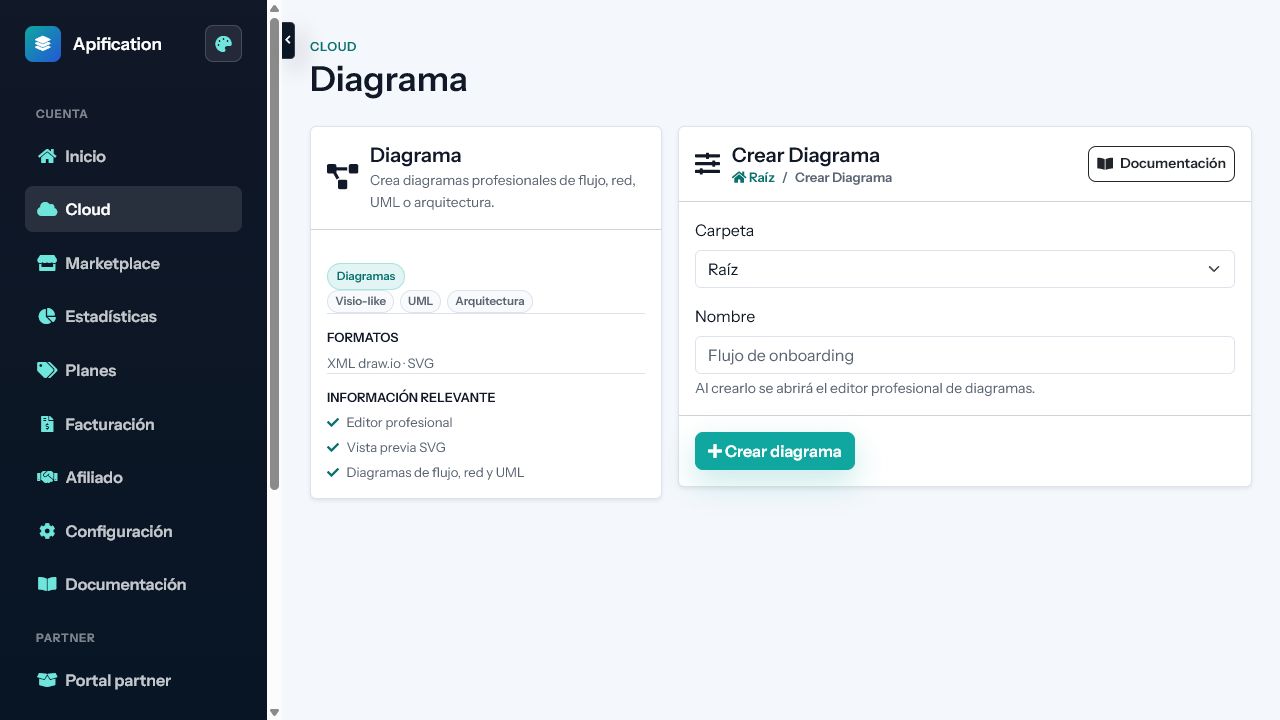
The screenshot shows the product’s current interface inside an Apification account.

Diagrams and whiteboard interface in Apification
Structured diagrams

Build flowcharts, UML, network and process diagrams with shapes, connectors and semantic labels.

Free-form whiteboard

Sketch ideas with drawing tools, text, arrows, images and hand-drawn visual styles.

Alignment and organization

Group, align, distribute, layer, lock and reorder objects to keep complex scenes manageable.

Features

What Diagrams and whiteboard can do

01

Structured diagrams

Build flowcharts, UML, network and process diagrams with shapes, connectors and semantic labels.

02

Free-form whiteboard

Sketch ideas with drawing tools, text, arrows, images and hand-drawn visual styles.

03

Alignment and organization

Group, align, distribute, layer, lock and reorder objects to keep complex scenes manageable.

04

Reusable Cloud images

Insert media from Cloud and retain the visual project beside the rest of its resources.

05

Editable source preservation

Store diagram XML or whiteboard scene data so exported images do not replace the editable original.

06

Page and canvas controls

Configure zoom, grid, guides, page size, orientation, scale and background according to the tool.

07

Visual export

Generate PNG, JPEG, SVG or PDF outputs while preserving the original project for later changes.

Technical information

Inputs, results, and work continuity

Supported inputs

Shapes, connectors, text, freehand drawing, images, and scene data.

Results and export

Editable projects and PNG, JPEG, SVG, or PDF deliverables depending on the tool.

Work continuity

Objects remain editable in the Cloud service even after final exports are created.

Practical examples

From input to result

Configuration

Free-form whiteboard

Result
Sketch ideas with drawing tools, text, arrows, images and hand-drawn visual styles.
Configuration

Alignment and organization

Result
Group, align, distribute, layer, lock and reorder objects to keep complex scenes manageable.
Configuration

Reusable Cloud images

Result
Insert media from Cloud and retain the visual project beside the rest of its resources.
Recommended configurations
FlowchartUMLNetworkWhiteboard

Limits and requirements

  • Requires a modern browser with JavaScript enabled.
  • Keep the project or scene data, not only the export, to continue editing.
  • Maximum size depends on the extension and the limits configured for the account.

Privacy and data

  • Layers, tracks, and settings are saved without modifying source files.
  • New resources remain private until their visibility is changed.
  • PNG, SVG, or PDF files are deliverables; the editable project is kept separately.

Integration and automation

  • The shared Cloud picker reuses files without uploading duplicates.
  • Saved results can be opened or selected in other studios and services.
  • Transformed downloads reuse the formats supported by File Transformer.

Plans and usage

  • The editable project and every saved render are counted as separate resources.
  • Operations use the effective configured tariff; an estimate is shown before execution when applicable.
Frequently asked questions

Questions about Diagrams and whiteboard

No. Diagrams prioritise shapes, connectors, and technical structures, while whiteboards focus on freehand drawing and visual exploration.

It does not retain the object structure. Keep the Cloud service, XML, or original scene data to continue editing.

Depending on the tool, you can generate PNG, JPEG, SVG, or PDF while keeping the editable project separately.