Product

Landing pages

Build publishable pages with sections, forms, Cloud media, analytics and artificial intelligence assistance.

Overview

Build publishable pages with sections, forms, Cloud media, analytics and artificial intelligence assistance.

Real interface

An environment integrated into Apification

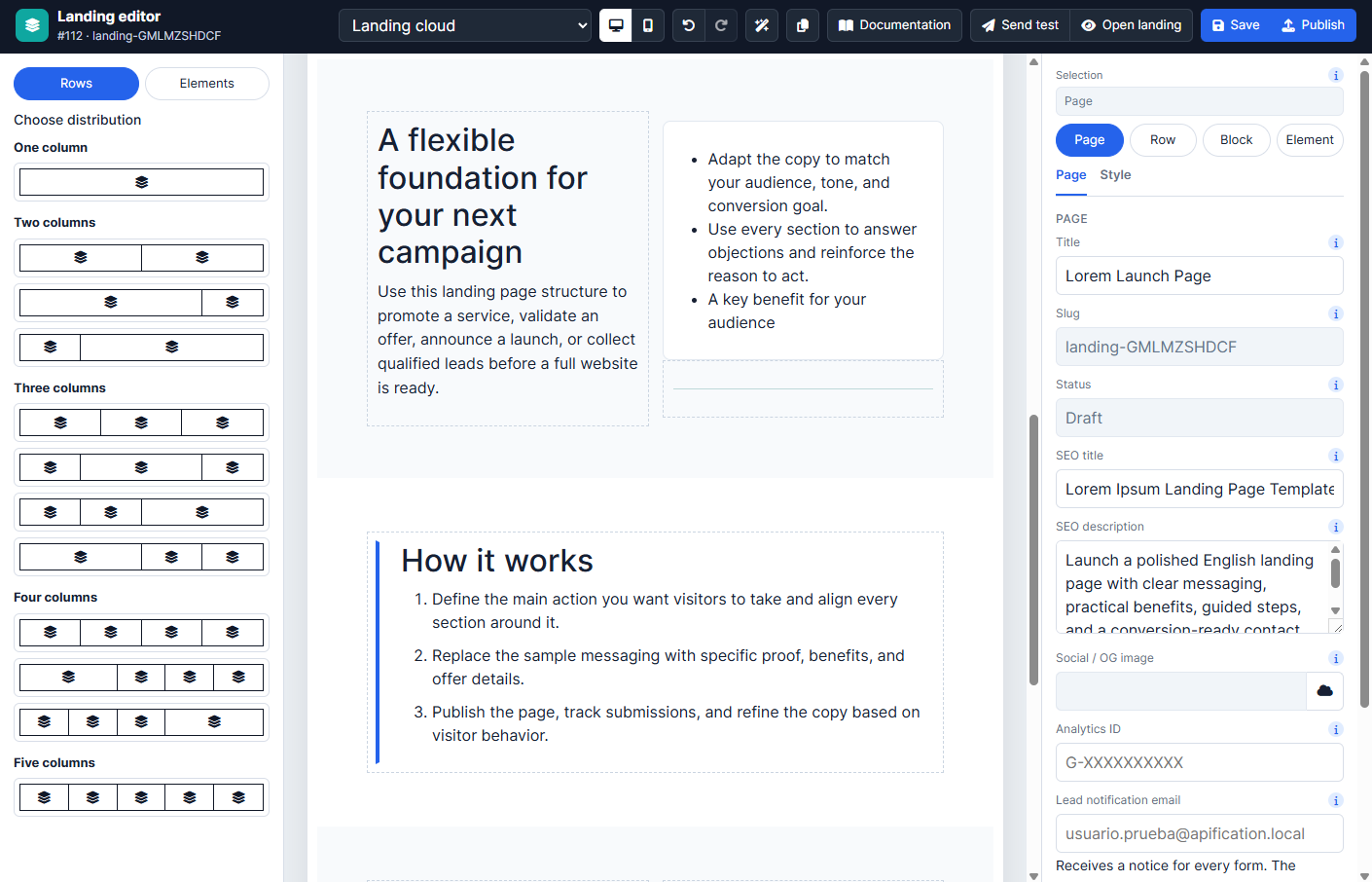
The screenshot shows the product’s current interface inside an Apification account.

Landing pages interface in Apification
Section-based visual builder

Compose responsive pages with reusable content sections and controls tailored to each block.

Cloud image and video assets

Select every visual resource through the shared Cloud picker and keep media linked to the project.

Navigation and visual theme

Configure menus, typography, colors, spacing and responsive behavior for a consistent page.

Features

What Landing pages can do

01

Section-based visual builder

Compose responsive pages with reusable content sections and controls tailored to each block.

02

Cloud image and video assets

Select every visual resource through the shared Cloud picker and keep media linked to the project.

03

Navigation and visual theme

Configure menus, typography, colors, spacing and responsive behavior for a consistent page.

04

Forms and lead capture

Add configurable forms, validate submissions and retain leads for review or export.

05

Publication controls

Manage visibility, publication periods, access restrictions and the public service URL.

06

Analytics events

Record visits and relevant interactions to understand page and campaign performance.

07

AI-assisted content

Generate initial text and page structures, then review and edit them before publication.

08

Advanced HTML editing

Use the HTML editor for controlled adjustments when the visual section options are not sufficient.

09

Cloud save and sharing

Keep the landing as an editable, versioned and shareable service inside the same workspace.

Technical information

Inputs, results, and work continuity

Supported inputs

Sections, text, forms, images, video, templates, and AI assistance.

Results and export

Published landing page, leads, analytics events, HTML, and exportable catalogue.

Work continuity

Composition, settings, leads, analytics, and versions remain associated with the landing page.

Practical examples

From input to result

Configuration

Cloud image and video assets

Result
Select every visual resource through the shared Cloud picker and keep media linked to the project.
Configuration

Navigation and visual theme

Result
Configure menus, typography, colors, spacing and responsive behavior for a consistent page.
Configuration

Forms and lead capture

Result
Add configurable forms, validate submissions and retain leads for review or export.
Recommended configurations
Lead captureEvent pageProduct launchNewsletter

Limits and requirements

  • Requires a modern browser with JavaScript enabled.
  • Images and videos are selected from Cloud through the shared picker.
  • AI assistance and notifications require their corresponding providers.

Privacy and data

  • Leads and analytics events belong to the account that publishes the landing page.
  • Users, groups, links, and publication are managed through separate controls.
  • Publication and public access are enabled explicitly.

Integration and automation

  • Public links and published views distribute the result.
  • Results and activity can be viewed, exported, or sent to other systems.
  • Webhooks report relevant changes and retain deliveries, responses, and retries.

Plans and usage

  • Originals, projects, versions, and results use account storage.
  • Public views or interactions may use the tariff configured for each service.
Frequently asked questions

Questions about Landing pages

No. They are selected from Cloud with the shared picker, avoiding duplicates and retaining ownership and access controls.

No. AI prepares a starting point that must be reviewed, edited, and saved before publication.

Yes. Landing pages support forms, lead storage, and analytics events according to the service configuration.