Multitrack timeline
Arrange video, audio, images, text and subtitles over a zoomable timeline with time references.

Edit video, audio, images, text and subtitles in a multitrack editor with preview and rendering.
The screenshot shows the product’s current interface inside an Apification account.
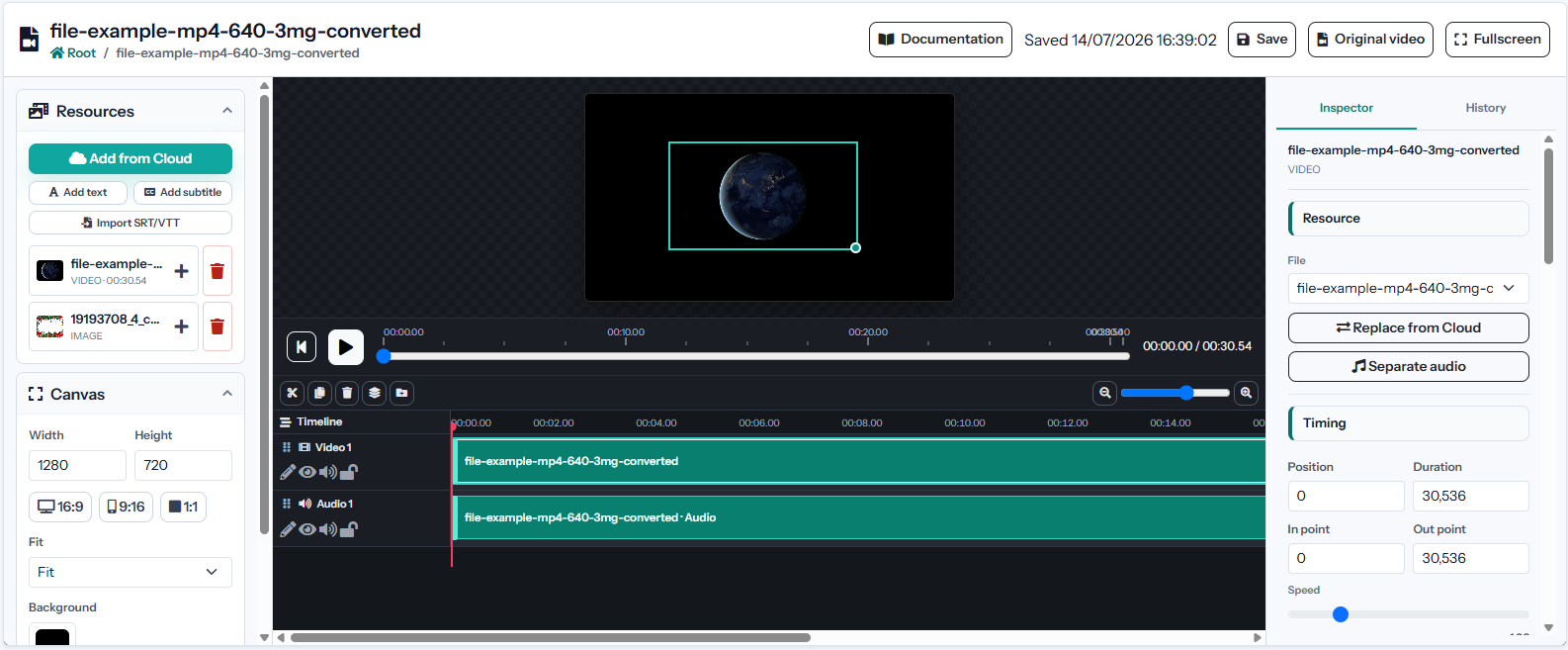
Arrange video, audio, images, text and subtitles over a zoomable timeline with time references.
Create, rename and reorder persistent layers and folders to control visual stacking and project structure.
Move clips horizontally in time or vertically between compatible layers with visible drop indicators.
Arrange video, audio, images, text and subtitles over a zoomable timeline with time references.
Create, rename and reorder persistent layers and folders to control visual stacking and project structure.
Move clips horizontally in time or vertically between compatible layers with visible drop indicators.
Change resolution, orientation, aspect ratio, background and safe guides for each distribution channel.
Trim source ranges and change start, duration and speed without modifying the original Cloud file.
Position, resize, rotate, flip, crop and change opacity for every visual clip.
Adjust volume, mute or normalize sound and apply fade-in, fade-out and layer entrance or exit effects.
Add styled text and subtitle clips or import SRT and VTT files with their original timing.
Choose video containers, codecs, resolution, FPS, quality and bitrate from compatible combinations only.
Undo or redo edits, save the editable project and render the final video for download or Cloud storage.
Video, audio, images, text, and SRT/VTT subtitles from Cloud.
MP4, WebM, MOV, MKV, AVI, MPEG, and other supported containers and codecs.
The project retains timeline, layers, folders, clips, and export settings.