Agencies and subaccounts
White-label embedded Cloud: layers, permissions and configuration without breaking the integration
A practical guide to embedding Apification Cloud in your own portal by separating branding, configuration, permissions, credentials and server actions.

The problem: looking integrated does not mean being well integrated
A white-label embedded Cloud can look perfectly at home inside a portal and still be poorly separated in terms of permissions, credentials or responsibilities. The risk appears when the iframe is treated like a decorated public window: the color is customized, buttons are hidden and the integration is considered solved. In reality, the embedded session must be launched with identity, effective policy and visual configuration resolved on the server for every opening. If that resolution does not exist, the branding can hide errors in isolation between clients, overly broad links or actions that should depend on the backend.
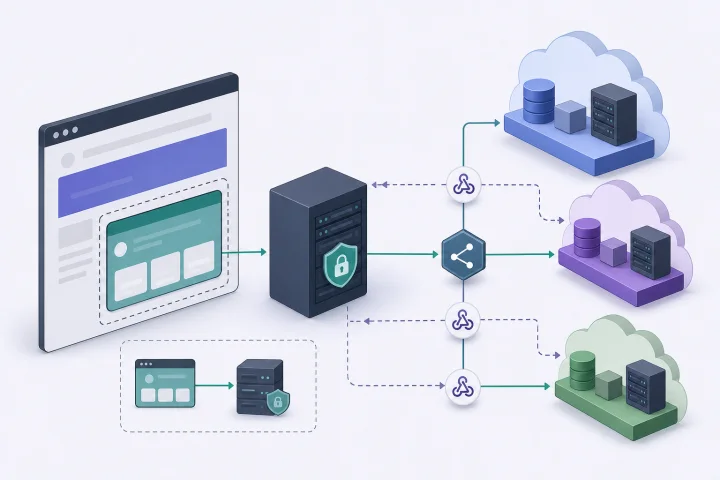
Apification approaches reseller integration as a combination of embedded Cloud, API, inherited configuration and visual themes. That combination matters because each piece has a different role. The iframe provides the user experience inside the portal; the REST API and OpenAPI contract are used for server-to-server operations; webhooks make it possible to react to events with signed deliveries, history and retries; and visual themes adapt the experience without changing functional and security boundaries. The key decision is not to ask one layer to do another layer’s job.
- Warning sign: the same link or session works for more than one client.
- Warning sign: integration keys appear in browser code.
- Warning sign: the visual review is approved before validating users, groups, links and restrictions.

Layer map: iframe, API, JavaScript, configuration and theme
The first layer is the embedded interface. In Apification, the embedded Cloud is presented as a workspace inside the product with a controlled, branded session, signed iframe sessions, themes, effective permissions and JavaScript communication with the host. For resellers, the iframe session is signed and short-lived. This reduces the temptation to create permanent access and forces every launch to have context: subaccount, user and permitted resources.
The second layer is the server integration. The server-to-server REST API manages Cloud resources, users, settings and transformation jobs from the backend. The REST reference is the authorized list of operations exposed by the API; functions not listed remain account interface flows. This prevents a dangerous expectation: not everything a user sees in the interface should be automated from the API. If an operation needs to be automated, check that it is in the reference and design the flow with limited-scope credentials.
- Iframe: controlled and branded user experience.
- REST API/OpenAPI: supported backend operations and automation.
- Host-iframe JavaScript: selection, completion and navigation through validated messages.
- Webhooks: reaction to events with HMAC-signed payloads, history and retries.

What the visual theme should solve and what it should not promise
The visual theme should solve experience consistency: colors, appearance and continuity between the client portal and the embedded Cloud. It is reasonable for an agency to want users not to feel a product jump when managing files, services or digital projects. Apification makes it possible to adapt the embedded Cloud experience through compatible themes and settings while preserving functional and security boundaries. That last part is essential: the theme accompanies the session; it does not redefine authorization.
What the theme should not promise is data isolation, security or permission changes. A less visible button is not the same as a prohibited action; a client-branded screen does not prove that the context is limited to that client’s subaccount; a corporate color does not expire links or restrict downloads. In an integration review, separate visual validation from permission validation. Approve the design when it is consistent, but do not use it as security evidence.
- Use the theme for appearance, perceived navigation and brand consistency.
- Do not use the theme to replace users, groups, restrictions or effective policies.
- Document which elements are visual customization and which elements are access rules.
Inherited configuration without turning it into a black box
Inherited configuration is used to reduce repeated manual settings across spaces or clients. In a client network, it avoids configuring each embedded experience from scratch and helps maintain operational consistency. In Apification, the effective launch configuration combines master policies, client settings, theme and permissions. That combination makes it possible to start from a common baseline and adjust what is specific to each client, as long as the team knows which rule comes from where.
The common failure is for inheritance to become invisible. If no one distinguishes between master policy, client setting, theme and permission, an incident is investigated blindly. To avoid this, maintain a configuration matrix: which value is defined globally, what each client can change, what is calculated when launching the session and who approves it. For sensitive changes, test at least two clients with different configurations to confirm that inheritance is not leaking unwanted capabilities.
- Define a minimal and stable master policy.
- Allow client settings only when there is a clear operational reason.
- Record the source of each rule: master, client, theme or permission.
- Review the effective configuration before enabling production access.
Credentials and backend: separating user actions from automated actions
Server credentials must not reach the browser. Apification’s reseller integration documentation is clear: provisioning, secrets and signing remain on trusted servers, while the browser receives only limited and temporary context. It also advises against creating iframe sessions in the browser when doing so exposes reusable secrets. The backend must authenticate the client and create the signed context without giving the frontend a key that could be reused outside the intended flow.
In practice, it is useful to separate two types of actions. User actions occur inside the embedded session, with the effective permissions that correspond to that user, subaccount and resources. Automated actions run from the backend through the API with limited-scope credentials, granting only the required read or write access. For initial provisioning, the API can create client accounts, users and initial configuration from the reseller application. In addition, external identifiers should be mapped predictably so retries do not create duplicate resources, and compatible writes can be protected with idempotency keys.
- Never sign embedded sessions from browser code if doing so exposes reusable secrets.
- Use credentials with the smallest practical scope for the integration.
- Map external identifiers in a stable way to avoid duplicates.
- Apply idempotency to compatible writes when there are network retries.
Permissions, publishing and downloads before showing files
Before showing files inside the portal, review users, groups, links, restrictions and publishing windows. Apification makes it possible to share items through links, users or groups, and to provide original or transformed downloads. It also makes it possible to protect files and services with permissions, OTP, external authentication, restrictions and publishing windows. That is why the question is not only whether the iframe loads, but whether the right user sees the right resources during the right period and with the intended download type.
A signed session must be limited to the corresponding subaccount, user and permitted resources. It must not be reused for multiple subaccounts; changing clients requires a new authorized and signed context. This rule prevents one of the most serious failures in multi-client portals: keeping a session valid while the portal’s visual context changes. If the user selects another client, force a new server-side resolution of identity, effective policy, theme and permissions.
- Check users and groups before activating shared links.
- Review whether OTP, external authentication, restrictions or publishing windows apply.
- Validate whether the download should be original or transformed.
- When changing clients, generate a new signed context; do not reuse the previous session.
Recommended implementation flow and common failures
A prudent flow starts with a limited visual prototype, not with fully opening real files. First, validate that the embedded iframe fits into the portal and that host-iframe communication covers selection, completion and navigation through validated messages. Then create a permission test with users from different profiles and, if there are multiple clients, with separate subaccounts. Next, test allowed and denied actions, error handling, original or transformed downloads and expiration of the temporary context.
Common failures follow a pattern: relying only on the iframe, customizing the interface before defining permissions, mixing clients in the same context, leaving links active indefinitely or not recording which part controls each action. The solution is to assign responsibilities. The theme controls appearance; inherited configuration provides consistency; the backend signs, provisions and stores secrets; the API automates supported operations; permissions govern access; and webhooks notify events with signed deliveries, history and retries. When each layer has an owner, incidents are easier to reproduce and correct.
- Step 1: visual prototype with non-sensitive data.
- Step 2: permission matrix by user, group, client and resource.
- Step 3: tests for allowed actions, denied actions and expected errors.
- Step 4: review of links, windows, OTP if applicable and downloads.
- Step 5: internal documentation of which layer controls each decision.
Frequently asked questions
Can a white-label embedded Cloud be solved with only an iframe?
It is not advisable to approach it that way. In Apification, the embedded integration combines a signed iframe, API, inherited configuration, visual themes, effective permissions and validated JavaScript communication with the host.
Where should signed iframe sessions be generated?
They must be generated on trusted servers. The backend authenticates the client and creates the signed context; the browser should only receive limited and temporary context, with no reusable secrets.
Can the visual theme change permissions or isolate data between clients?
No. The theme adapts the appearance and consistency of the experience, but it must preserve functional and security boundaries. Isolation depends on the signed context, permissions and effective policies.
What happens if the user changes clients inside the portal?
A new authorized and signed context must be created. An embedded session must not be reused for multiple subaccounts, even if the portal interface has already changed visually.
When should the API be used, and when should the embedded interface be used?
Use the embedded interface for user actions inside the Cloud. Use the REST API for supported server-to-server operations, such as managing Cloud resources, users, settings and transformation jobs, always according to the authorized reference.
Sources and further reading
Documentation consulted while preparing this article.
- Integración para resellers — Apification
- Integrate Apification into your product — Apification
- REST API reference — Apification
- Apification Cloud — Apification
- Sharing and distribution — Apification
- Security and access control — Apification
- Landing pages — Apification
- Survey documentation — Apification
- Permissions Policy — MDN Web Docs
- iframe: HTML inline frame element — MDN Web Docs
Explore Apification
Related articles
Agencies and subaccounts
Delegated Subaccounts Without Exposing Keys: A Secure Pattern for Agencies
A practical guide for agencies that want to give each client autonomy in Apification without handing over credentials or mixing files, permissions, or operations.

Agencies and subaccounts
File selection workflow for agencies: receive, review and deliver without losing versions
An operating pattern for agencies and creative teams to receive client materials, select assets, coordinate reviews and deliver final files with version control.