Agencies and subaccounts
Delegated Subaccounts Without Exposing Keys: A Secure Pattern for Agencies
A practical guide for agencies that want to give each client autonomy in Apification without handing over credentials or mixing files, permissions, or operations.
The problem: client autonomy without losing control
An agency that manages deliverables for multiple clients usually needs two things that seem opposed: each client should be able to view, review, upload, or download files with some autonomy, while privileged operations remain under the agency’s technical control. The risk appears when teams try to solve this quickly by sharing credentials, creating a generic user for everyone, or allowing the browser to invoke internal actions with an API key. That path can mix spaces, break traceability, and make it very difficult to revoke access without affecting other clients.
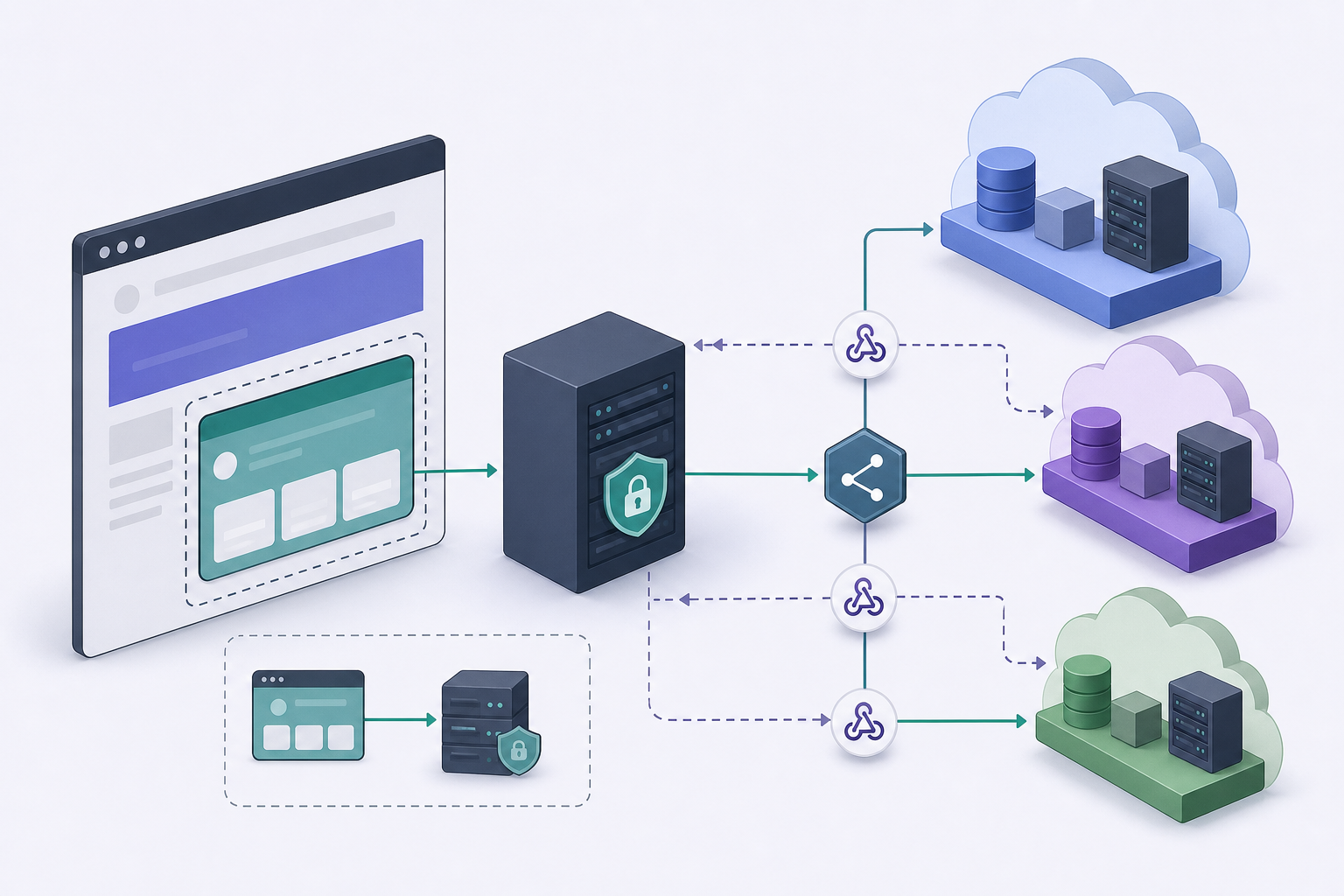
The right goal is not to hide an interface, but to separate responsibilities. The client should see only their authorized context; the agency backend should execute privileged actions; and Apification Cloud should enforce permissions, visibility, groups, restrictions, and limited embedded sessions. This pattern makes it possible to delegate subaccounts without exposing API keys, keeping secrets on the server and reducing dependence on manual operations such as moving files, generating links, or checking transformation jobs one by one.
- Avoid giving API credentials to the client or including them in JavaScript.
- Do not use a shared account for multiple clients if you need operational isolation.
- Define from the start which actions are user actions and which are backend actions.
- Treat every content exposure as an explicit exception over resources that are private by default.

Mental model: three separate layers
The first layer is the embedded interface. Apification lets you integrate Cloud through an iframe, inherited configuration, and visual themes, so an agency or reseller can offer an experience integrated into its own ecosystem. In this model, the iframe session must be built before it is displayed: identity, effective policy, and visual configuration are resolved on the server for each launch. The embedded session can be limited to the permitted subaccount, user, and resources, preventing the browser from deciding on its own what it can open.
The second layer is your own backend. API credentials, webhook secrets, and signing material live there, because Apification specifies that they must remain on the server and that the browser should receive only limited or temporary context. The third layer is Cloud controls: permissions, users, groups, visibility, restrictions, OTP, external authentication when applicable, and publishing windows. The design rule is simple: the interface guides the user, the backend executes privileged actions, and Cloud preserves the access policy associated with the resource.
- Iframe: user experience and selection within a limited context.
- Backend: creation of signed sessions, API calls, and validation of client rules.
- Cloud: files, folders, editable services, results, history, permissions, and visibility.
- Webhooks: event notifications with signature, retries, history, and statistics.

What Apification brings to this pattern
Apification brings together the pieces needed for controlled delegation. Cloud keeps files, folders, editable services, and generated results inside the same organized and versioned workspace. New resources are private by default and are published or shared only when their visibility or recipients are expressly configured. They can also be shared with users or groups without changing public visibility, which matters when an agency needs to give internal access to client reviewers without making a deliverable public.
For integration, Apification offers a server-to-server REST API to manage Cloud resources, users, configuration, and transformation jobs from the backend, as well as a downloadable OpenAPI contract with request and response schemas. It also lets you integrate Cloud and services through iframe, API, webhooks, and JavaScript, but the key is not to confuse “JavaScript integration” with “secrets in the browser.” For asynchronous operations, signed webhooks with retries, history, and statistics are preferable to polling in production when completed or failed transformation events are expected.
- Use specific API keys with only the scopes needed.
- Rely on OpenAPI to validate contracts before programming.
- Use webhooks in production to reduce repeated queries and improve traceability.
- Reserve OTP for public interactions; use users, groups, and visibility for internal access.
Recommended architecture for delegated subaccounts
The recommended flow starts in the agency portal. The client user authenticates in the agency’s system and requests to open their file area or a specific operation. The backend validates which client they belong to, what role they have, and which resources they can use. Only then does the trusted backend request or create a short-lived signed iframe session, with the isolated client context: subaccount, user, and permitted resources. The browser receives that limited session, not an API key or reusable secret.
When the client needs a privileged action, such as creating a transformation job, querying a resource, or preparing a transformed download, the browser should call the agency backend, not connect directly with permanent credentials. The backend applies business rules, invokes the Apification REST API with Bearer authentication from the server, and records the action. If the host and the iframe coordinate through browser messages, those messages must be validated: the receiver must check origin, intent, and expected data, following the general principle of validating cross-window communications.
- Step 1: authenticate the client in the agency portal.
- Step 2: resolve identity, effective policy, and visual theme on the server.
- Step 3: request a short-lived, limited, signed iframe session.
- Step 4: execute REST calls only from the backend with a minimum-scope key.
- Step 5: record events and responses for operational auditing.
Client-by-client delegation: permissions, spaces, and rules
Separation should not depend only on a folder name. In Apification, moving a Cloud item changes its organization, not its identity: its properties and access rules remain associated with the same item. This is useful for reorganizing deliverables without losing controls, but it also shows why isolation must be based on permissions, users, groups, visibility, and authorized resources, not fragile conventions such as “everything under /client-a.” The agency should document the access matrix for each client and review it when the service contract changes.
A practical matrix distinguishes at least five actions: uploading or adding files, transforming or processing content, reviewing versions, downloading originals or generated formats, and publishing links or access. Cloud lets users download the source file or generate a compatible format from the sharing flow, so it is worth deciding who can deliver originals and who should only receive derivatives. If editable services are used, such as office documents, image editing, or multimedia editors, the same logic applies: the client does not need universal permission, but the minimum set of actions for their use case.
- Define groups by client or by role within the client.
- Separate review, transformation, download, and publishing as distinct permissions in your design.
- Avoid making a folder change the only control mechanism.
- Maintain a revocation procedure for when a client contact is no longer involved.
Typical operations and how to automate them
In day-to-day operations, the client can select files from the iframe, review deliverables in Cloud, download an original, or request a transformed version. The agency, for its part, can create jobs from the backend, apply client rules, and use item history to review earlier versions or restore content when needed. This approach reduces scattered emails and prevents the internal team from having to act as an intermediary for every download or basic review.
For asynchronous processes, design around events. If a transformation completes or fails, a signed webhook can notify the agency backend. That backend must verify the signature with the secret stored on the server, deduplicate events, and update its own state. Apification supports idempotent writes through an idempotency key in compatible operations, so actions that could be repeated due to retries, double-clicks, or reconnections should send a stable key. This prevents duplicate jobs or publishing the same result twice.
- Use webhooks for job completion and errors, not only periodic queries.
- Verify the signature before trusting the event content.
- Store event or result identifiers to deduplicate.
- Apply idempotency keys in compatible writes that may be repeated.
- Keep an operational record of who requested the action, which resource it affected, and what the result was.
Common mistakes and failure modes
The most serious mistake is putting keys in JavaScript. Even if an interface is private or behind a login, any secret delivered to the browser must be considered exposed. Another common failure is using a single user for all clients: it may seem convenient at first, but it prevents action attribution, makes access revocation harder, and increases the impact of any configuration error. It is also dangerous to rely only on folder names, because visual organization does not replace access rules associated with resources and users.
In automation, failures often appear when teams do not verify webhook signatures, process the same event twice, or assume that a one-off import is equivalent to continuous synchronization. If a webhook delivery is retried and your backend is not idempotent, you can duplicate jobs or notifications. If you do not test with lower-privilege users, you may discover too late that a role can download originals when it should only view transformed files. The defense is to test negative cases: wrong user, resource from another client, expired session, invalid signature, and repeated event.
- Do not expose Bearer tokens, webhook secrets, or signing material in the frontend.
- Do not mix clients under a single operational identity.
- Do not process webhooks without verifying the signature and deduplicating.
- Do not treat a one-off import from external providers as continuous synchronization.
- Do not grant broad API scopes if the integration only needs a subset.
Implementation checklist before production
Before opening access to clients, prepare both a technical and an operational checklist. On the technical side, create a specific API key for the integration and grant only the necessary scopes for account, Cloud, transformations, users, or webhooks. Store the key and secrets in server variables or server-side storage, never in the client. Implement client validation in every internal endpoint: no browser request should be able to freely indicate another client, subaccount, or resource without the backend checking it against its own authorization.
In the operational checklist, document who can upload, transform, review, download, share, and revoke. Create tests with lower-privilege users, validate expired iframe sessions, and check that resources remain private unless expressly published. For webhooks, test an invalid signature, a duplicated event, and a retry. For writes, apply idempotency when available. Finally, define how to remove access for a client or user without affecting others: that revocation capability is one of the main reasons to separate subaccounts and not depend on shared credentials.
- Permission matrix by client, role, and action.
- Specific API keys, minimum scopes, and secrets only on the server.
- Short, signed iframe session created from the trusted backend.
- Validation of subaccount, user, and resource in every operation.
- Webhook signature verification, deduplication, and idempotency.
- Negative tests with limited roles and resources from other clients.
- Documented plan for revoking users, groups, and published access.
Frequently asked questions
Can I delegate client access using only an iframe?
The iframe is one part of the pattern, not the whole pattern. In Apification, the context must be built in the backend before it is displayed, with a signed, short-lived session limited to the permitted subaccount, user, and resources.
Where should Apification API keys be stored?
They must remain on the server. The browser should receive only limited or temporary context; API credentials, webhook secrets, and signing material must not be exposed in JavaScript.
When should I use the REST API instead of the iframe?
Use the REST API from the backend for privileged actions such as managing Cloud resources, users, configuration, or transformation jobs. Use the iframe so the user can interact with the authorized context.
Why are signed webhooks important?
They let you receive events, such as completed or failed transformations, with delivery validation. The backend must verify the signature, deduplicate events, and record the result before acting.
Is separating folders by client enough?
No. Folders help with organization, but control must be based on subaccount, user, group, permissions, visibility, and authorized resources. Moving an item changes its organization, not its identity or associated rules.
Sources and further reading
Documentation consulted while preparing this article.
- Apification — Integración para resellers — Apification / Afilnet SL
- Apification — Integra Apification en tu producto — Apification / Afilnet SL
- Apification — Seguridad y control de acceso — Apification / Afilnet SL
- Apification — Cloud de Apification — Apification / Afilnet SL
- Apification — Automatización y webhooks — Apification / Afilnet SL
- Apification — Almacenamiento organizado — Apification / Afilnet SL
- RFC 2104 — HMAC: Keyed-Hashing for Message Authentication — IETF / RFC Editor
- RFC 9110 — HTTP Semantics — IETF / RFC Editor
- OWASP Cheat Sheet Series — Secrets Management — OWASP Foundation
Explore Apification
Related articles
Agencies and subaccounts
White-label embedded Cloud: layers, permissions and configuration without breaking the integration
A practical guide to embedding Apification Cloud in your own portal by separating branding, configuration, permissions, credentials and server actions.

Agencies and subaccounts
File selection workflow for agencies: receive, review and deliver without losing versions
An operating pattern for agencies and creative teams to receive client materials, select assets, coordinate reviews and deliver final files with version control.