APIs and automation
Uploading Files to an API: Multipart or Base64 and How to Prevent Corrupted Uploads
The right representation depends on each endpoint’s contract. Learn how to inspect it, build compatible requests, and verify the received file before putting the integration into production.
The Endpoint Determines How to Send the File
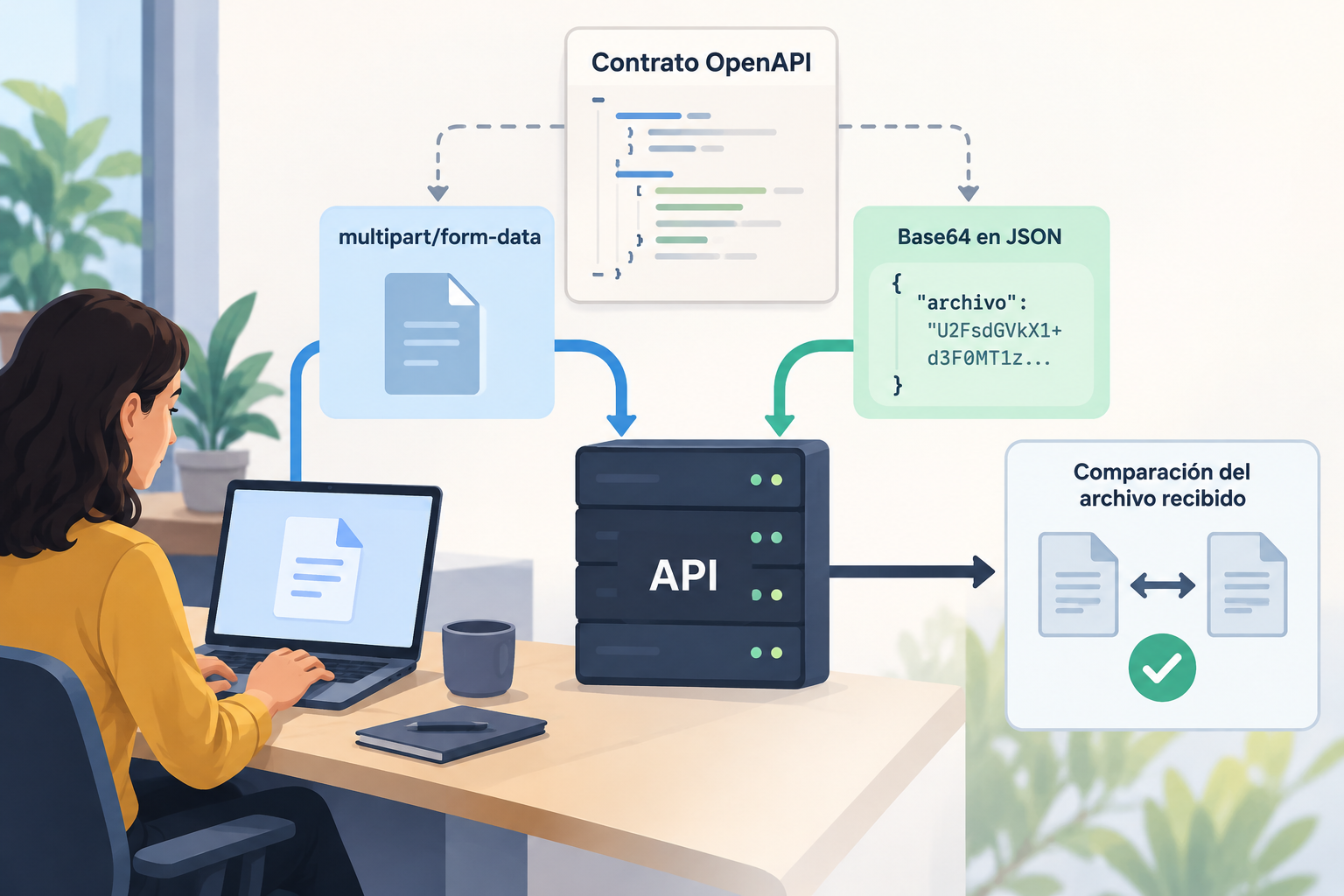
Uploading a file to an API means including its contents in an HTTP request that the server can interpret. There is no universal format that works for every endpoint: one may expect a multipart/form-data upload, another a JSON object with encoded content, and another a different mechanism described in its contract. The file extension or the fact that a request uses POST is not enough to determine what structure to send. The first task is to identify the specific operation and follow what it declares.
Separating the file representation from the business logic helps diagnose problems. The representation determines how the bytes and fields travel; the endpoint determines which fields it requires, which types it accepts, and what response it produces. If you send a body that is valid for a different operation, the server may reject it or process it unexpectedly. Before writing code, note the method, route, authentication, content type, required fields, documented limits, and error responses.
- Do not infer the accepted format from the route name or from an integration with another provider.
- Treat request examples as guidance, but check that they apply to the same version and operation.
Multipart/form-data and Base64 in JSON
With multipart/form-data, the body is divided into separate parts. Each part has its own headers and content, so a request can combine the file with additional fields, if the endpoint supports them. The client constructs the boundaries between parts; for that reason, when using an HTTP library, it is usually best to let the library generate the complete Content-Type header and its boundary. Setting it manually without preserving the boundary that matches the body is a common cause of requests the server cannot parse.
With Base64, the file’s bytes are converted to text, and that text is included in a JSON document, for example in a property defined by the contract. This encoding usually increases the transmitted size compared with the binary file and adds a conversion step when preparing and processing the content. Do not assume the property name, whether a media type prefix is required, or whether the endpoint accepts Base64: these are decisions made by the schema. For large uploads, compare the cost and documented limits before choosing.
- Multipart is suitable when the contract describes form parts and a file part.
- Base64 is an option only if the endpoint declares that representation; having a JSON body is not enough.

Inspect OpenAPI Without Making Assumptions
Consult the available OpenAPI specification and locate the exact operation by route and method. Check the content type accepted for the request body, the associated schema, and the required properties. For multipart, verify how the file is declared and what the parts are named; for JSON, look for the structure and data type specified for each field. OpenAPI documentation matters because acceptance of multipart uploads should be specified in the contract rather than inferred intuitively.
Also read the documented responses, authentication requirements, and any limits or restrictions associated with the operation. An example does not necessarily document every valid case, and missing information does not mean you are allowed to send arbitrary files. If the schema is missing, the content type is unclear, or the instructions contradict one another, ask the API owner for confirmation before coding. Keep a record of the contract version used to implement and test the integration.
- Confirm the method, route, Content-Type, body schema, required fields, and possible responses.
- Do not infer limits, permissions, supported formats, or storage behavior from a general product description.
Building the Request and Common Errors
In a conceptual multipart example, the client sends a part with the field name declared by the contract and the file’s binary content; it may include other parts only if they are documented. In a conceptual JSON example, read the bytes, encode them as Base64, and place them in the exact property defined by the schema. These examples describe patterns, not a request compatible with a specific Apification endpoint. Apification’s integration includes REST API and OpenAPI, but the information available here does not specify which operation accepts files or which schema it uses.
Check that the file opens correctly before sending it and that the program is not reading the wrong path, an empty file, or a partial version. Do not confuse the file name or extension with the MIME type: they may not match, and the value to send depends on the contract. Avoid truncating Base64 when logging requests or passing JSON between components. Also account for size limits in the client, intermediaries, and server, because a rejection may occur before the endpoint processes the body.
- Common errors include an incorrect field name, malformed JSON, a missing multipart boundary, truncated Base64, and an unaccepted MIME type.
- Do not log the complete file contents; record the metadata needed for diagnosis without exposing the document.
Verify End to End That No Corruption Occurred
A successful HTTP response alone does not prove that the stored content matches the source file. Design a test that sends a representative file and then retrieves the received object using the mechanism documented by the API. If there is no documented way to retrieve it, confirm what verification the service provides; do not assume that the response contains the file or that a download operation exists. Keep the original test file unchanged and record its size and, if the workflow allows, a locally calculated hash.
Compare the retrieved file with the original using a binary comparison or by calculating the same hash for both. Test several relevant file types and sizes for the integration, including small files and files close to the documented limit. Also review the response code, error body, and safe client logs. If the result differs, isolate where the change occurred: local reading, encoding, transport, server processing, or subsequent download.
- Test at least one binary file and one file with text content; include names with spaces or non-ASCII characters if the contract allows them.
- Repeat with requests that exceed limits only in a controlled environment, and confirm that the rejection is clear and does not leave a partial object.
Pre-Integration Checklist
Before deployment, turn the contract into a checkable list: correct operation and version, declared content type, exact fields and names, required authentication, known limits, and how to interpret responses. Implement the request with a library that handles multipart correctly or with reliable JSON serialization. Define what will happen for network errors, size rejections, invalid credentials, or malformed responses. Automatically retrying an upload is not always harmless: determine whether the endpoint allows retries without creating duplicates or ambiguous results.
Complete the review with operational controls. Limit access to the source file according to the integration’s needs, avoid including credentials or sensitive content in logs, and delete temporary files when they are no longer needed. Document how to reproduce a failed upload with a test file and how to validate receipt. Apification offers integration with Cloud and its services through REST API, OpenAPI, webhooks, iframe, and JavaScript; upload details, permissions, and each endpoint’s capabilities must be confirmed in the applicable documentation, not extrapolated from that general capability.
- The contract has been reviewed and versioned.
- The representation and limits have been confirmed for the specific endpoint.
- Integrity, error-handling, and retry tests have been completed.
- Access, logs, and temporary files have been reviewed.
Frequently asked questions
Is multipart/form-data always better than Base64?
No. The choice depends on what the endpoint accepts. Multipart separates the body into parts; Base64 represents the bytes as text within a structure, usually JSON. Review the contract and consider size and processing before deciding.
Can I send Base64 because the API accepts JSON?
Not necessarily. JSON only describes the body type. The schema must declare the property and representation expected for the file; confirm those details in OpenAPI or the endpoint documentation.
How can I tell whether the file arrived unchanged?
Use a documented method to retrieve the received file and compare it with the original, either with a binary comparison or a hash calculated for each. A successful response alone does not prove that the bytes match.
What should I confirm for an upload to Apification?
Check the documentation for the specific operation to confirm whether it accepts files, which content type and schema it expects, which limits and permissions apply, and how to verify the result. The general integration capability through REST API and OpenAPI does not specify those details.
Sources and further reading
Documentation consulted while preparing this article.
Explore Apification
Related articles

APIs and automation
JSON Lines or a JSON Array: Prepare Records for an API Without Losing Data
JSON Lines and a JSON array can contain similar records, but they do not have the same structure. Learn to check the API contract, transform a sample, and review the result before sending it.

APIs and automation
Process File Batches with Controlled Concurrency
A practical guide to organizing file-level jobs and designing concurrency and recovery based on each API’s documentation.

APIs and automation
Spreadsheet Dates in APIs: Avoid Ambiguous Formats and Day Changes
A practical guide to defining what each date represents, agreeing on an explicit format, and checking that data retains its meaning as it moves between a spreadsheet and an API.