Multimedia
Non-Destructive Multimedia Editing: How to Organize Originals, Projects and Exports Without Losing Control
A practical method for separating originals, work, review, finals and published files, with clear names, recoverable versions and controlled deliveries in Apification.
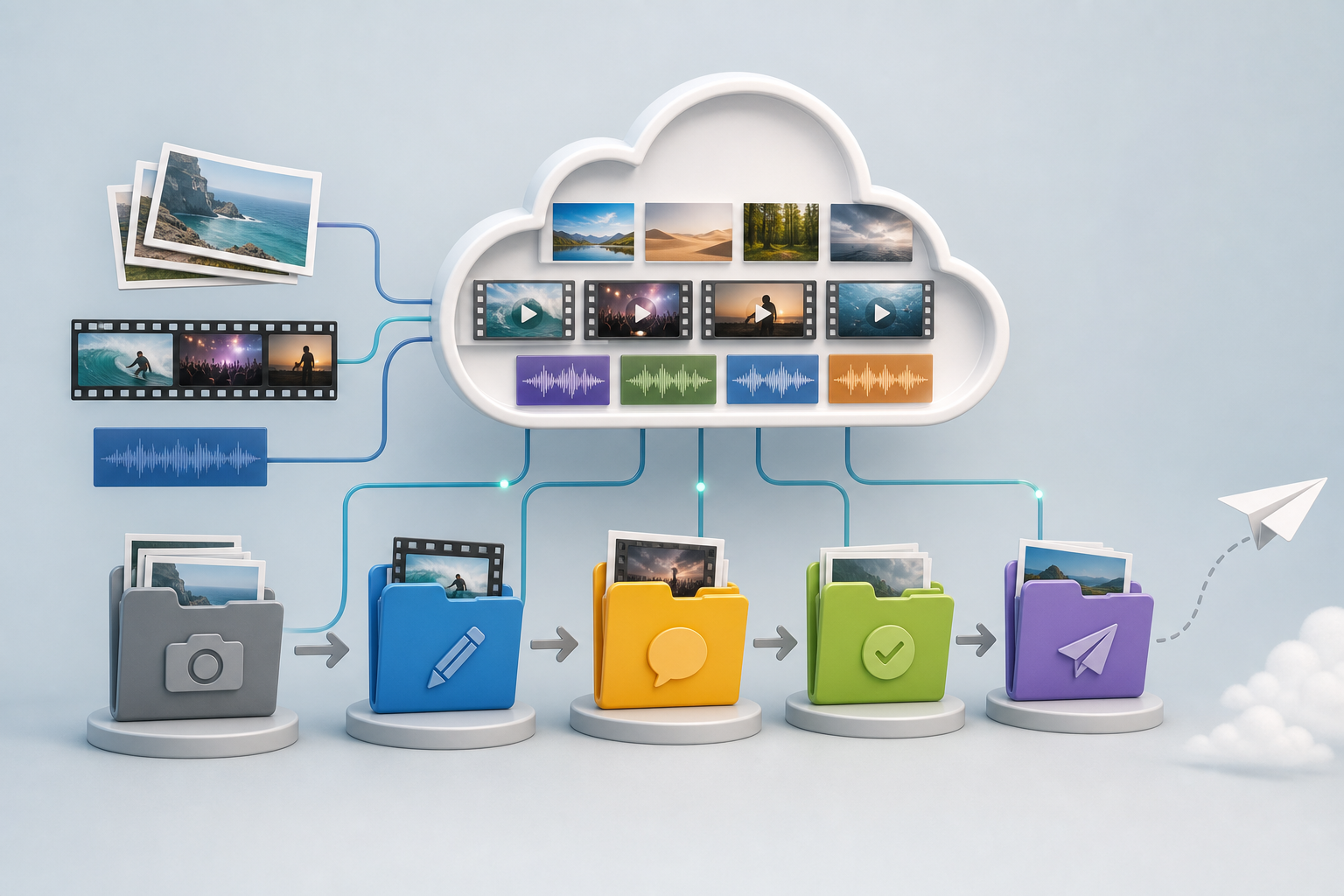
The problem: fast editing also breaks workflows
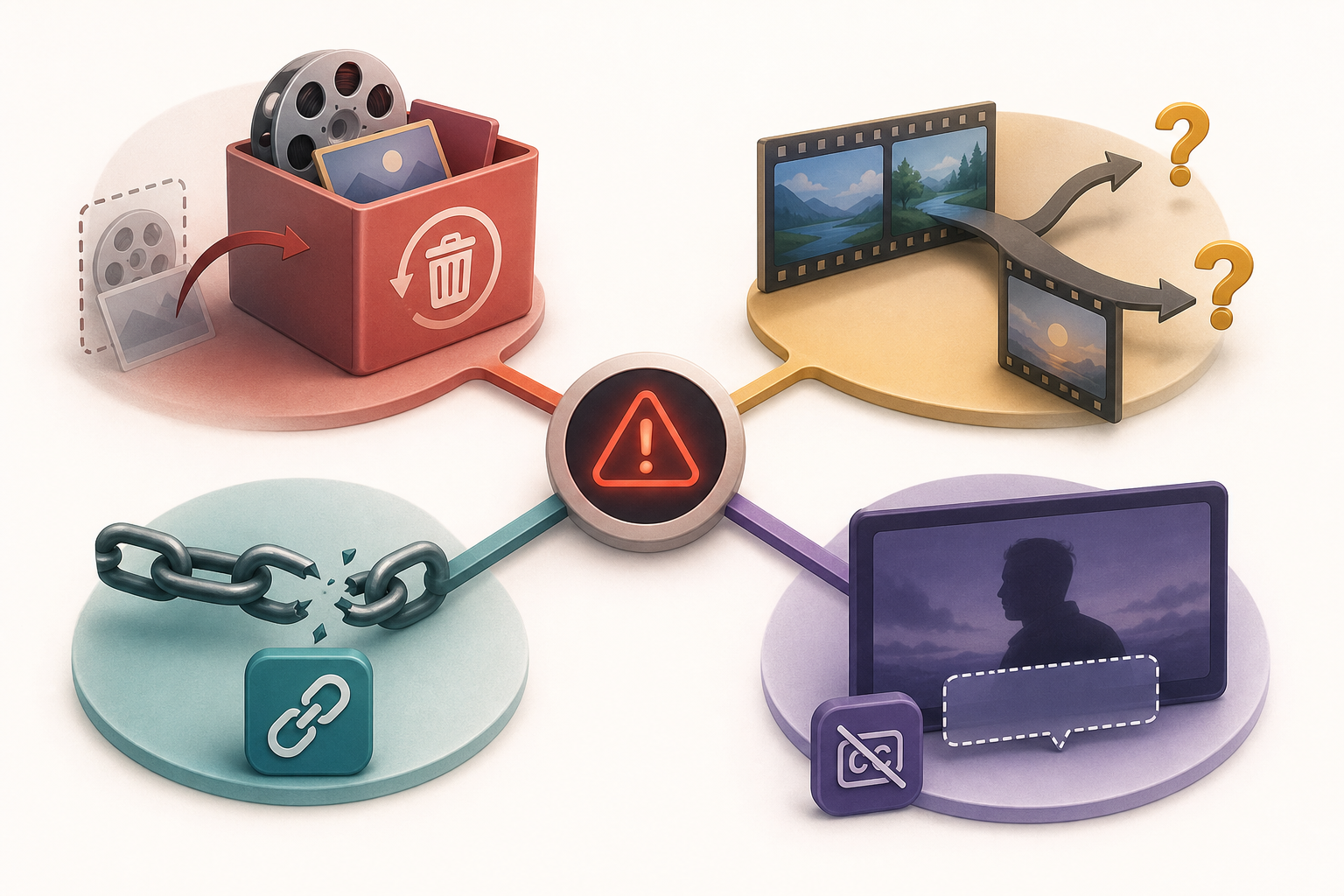
Non-destructive multimedia editing does not start in the editor, but in the decision not to treat every file as if it were replaceable. In marketing teams, small agencies or communications departments, one piece can include a main image, video clips, audio tracks, subtitles and several exports per channel. If everything lives in the same folder with names like final, final2 or client_ok, the risk is not just aesthetic: someone may overwrite the only original, approve a test or send a link to an old file.
The failure usually appears when there is a rush. A file is downloaded, adjusted, uploaded again with the same name and nobody knows whether the change affected the master or a derivative. It also happens when work and delivery formats are mixed: an editable project is confused with a final export, a version for review ends up published or subtitles are separated from the video they were meant to accompany. The solution is to combine simple habits with tools that respect history, permissions and the separation between project and result.
- Warning sign: a single file plays the role of original, draft, review and final at the same time.
- Warning sign: the shared link does not indicate whether it points to the master, an export or a transformed version.
- Warning sign: the approval status depends only on what someone remembers having sent.
What non-destructive means in a practical workflow
In practice, a non-destructive workflow means preserving the original, working on copies or editable projects, documenting changes and exporting independent derivatives. For composite images, for example, it is useful to keep both the individual source files and the composite file, because merging, composition or transformation processes can degrade or simplify information. The central idea is that the master remains available even if channel, language, aspect ratio or compression requirements change.
Non-destructive does not mean that you never export or that everything is reversible inside every format. It means that important decisions do not destroy the starting reference. The team must be able to answer four questions: which file is the original, where the editable project is, which export was approved and which link was shared. If any of those answers depends on reviewing old conversations, the workflow needs more structure.
- Criterion 1: the original is not edited directly unless there is an explicit and controlled decision.
- Criterion 2: derivatives keep a recognizable relationship with the master through a base identifier.
- Criterion 3: the status of each file is expressed in the name, folder or access control, not only in the team’s memory.
- Criterion 4: a final export can be recreated from the project without searching for scattered files.

Folder structure for originals, work and delivery
A simple and repeatable structure reduces arguments. One useful proposal is 01_originals, 02_work, 03_review, 04_finals and 05_published. The numeric prefix keeps the visual order and prevents each person from organizing according to their own intuition. 01_originals contains captures, raw footage, received audio, source graphics and received subtitles. 02_work stores editable projects, compositions and internal tests. 03_review holds exports intended for feedback. 04_finals contains approved deliverables. 05_published preserves what was actually shared or used.
This structure does not replace permissions or history, but it helps both make sense. In Apification Cloud, files, folders, editable services and generated results can be kept within the same organized and versioned workspace. You can also create folders, move resources, use the trash and restore items without losing the organization. One important operational detail is that moving a Cloud item changes its organizational location, but not its identity or associated permissions unless they are changed explicitly.
- 01_originals: received or captured material, without destructive retouching.
- 02_work: editable projects, internal tests and compositions in progress.
- 03_review: files exported for comments and approval.
- 04_finals: approved deliverables ready for use.
- 05_published: versions actually distributed or linked from campaigns, pages or mailings.
Naming convention for finding the right piece
Consistent, meaningful and descriptive names make it easier to maintain, identify and transfer electronic records. The most important rule is to always keep the same order of components. For a multimedia team, a reasonable pattern can be piece_channel_date_language_aspect_status_rXX. An example would be launch_instagram_2026-02-15_en_4x5_review_r02. The fixed order allows sorting, searching and comparing without interpreting each file manually.
Derivatives must keep a recognizable relationship with the master. If the base identifier is campaignA_interview01, exports can add qualifiers such as master, review, final, subtitled, vertical or optimized, but they should not break the link. For images, video and audio, the status must express the role of the file: original, work, review, approved, final or published. The date helps, but it does not replace the revision; a later export may be a test, not necessarily the approved one.
- Suggested pattern: piece_channel_date_language_aspect_status_rXX.
- Avoid: final_final_good, new_copy, test_ok or names that depend on one person.
- Use complete and sortable dates, such as 2026-02-15.
- Reserve published for what was actually shared, not for just any approved file.
How to use Apification Cloud for versions and recovery
Apification Cloud can act as a central space for managing files, services and digital projects from an organized, versioned environment prepared for sharing. In a non-destructive workflow, this means the team does not depend on scattered local folders or email attachments. New resources remain private until the user expressly changes their visibility or shares them, which helps separate internal work from external delivery.
History is a safety net, not an excuse for disorder. In Cloud, saved versions can be viewed, downloaded as previous content and restored to an earlier state when necessary. This is especially useful when an export was replaced by mistake or when you need to compare a previous file with the current one. Even so, it is advisable to name and place each relevant version properly: restoring is safer when you know what you are trying to recover and why.
- Before replacing an important file, confirm whether it is a master, project or derivative.
- Review the history when an approved piece seems to have changed without explanation.
- Download a previous version if you need to compare, not just overwrite.
- Restore content when the previous state is clearly the correct one.
Editing by media type without touching the master
For images, Image Studio lets you work on an integrated canvas with layers, text, shapes, filters and export in modern formats. Its value in a non-destructive workflow lies in separating source files, visual work and exports: originals are preserved in 01_originals, tests are placed in 02_work or 03_review and the resulting images are saved as deliverables when appropriate. This supports testing headlines, formats or calls to action without sacrificing the source.
For video, Video Studio lets you assemble video, audio, images, text and subtitles in a multitrack editor with preview and rendering. Clip editing is non-destructive: you can trim the source and modify start, duration and speed without altering the original Cloud file. It also lets you add styled text and subtitles or import SRT and VTT files while preserving their timings. For audio, Audio Studio lets you edit recordings and tracks on a multitrack timeline with effects, fades and professional export, maintaining a workflow oriented around projects and results.
- Image: preserve sources and use the layered canvas for design variations.
- Video: trim and adjust clips from the project, not from the original raw file.
- Subtitles: save SRT or VTT together with the corresponding project and export.
- Audio: separate source recording, multitrack editing and exported file.
Transformations, review and controlled delivery
Not every change requires opening an editable project. When the goal is to convert, split, merge, optimize or process documents, images, video, audio or data, Apification’s file transformation assistant lets you generate derivatives without touching the master. This approach is useful for preparing a more compatible version, a lighter download or a specific format for a channel. The rule is simple: if the creative content does not change and only the format or technical treatment changes, use a transformation as a derivative.
Delivery must distinguish audience and purpose. In Apification, items can be shared through links, specific users or reusable groups; you can also provide download of the source file or generate a compatible format from the sharing flow. A public link and authenticated access with users or groups are separate controls for different audiences. That is why, before sending, you should confirm whether the person needs to review, approve, download the original or receive a transformed version. Resending an old link is one of the most frequent mistakes.
- Use transformation for technical derivatives; use the editor when the composition or content changes.
- Share with users or groups when you need controlled access without publishing.
- Use a public link only when that visibility is appropriate for the audience.
- Indicate whether the recipient should download the original or a transformed version.
Final checklist for closing a multimedia piece
Before closing a piece, review the full workflow and not only the final file. The original must still be preserved in 01_originals, the editable project must be located in 02_work, the reviews sent must live in 03_review and the approved file must be in 04_finals. If it has already been shared or published, the exact version must be preserved in 05_published. This separation prevents a minor correction from accidentally turning an approved final into a different file.
It is also useful to record typical failures before they happen: editing the only original, mixing work and delivery formats, resending old links, losing subtitles or publishing a test export. Prevention does not require bureaucracy; it requires a consistent sequence. Naming well, placing well, reviewing history and sharing the right link are usually enough to make non-destructive multimedia editing sustainable in small teams and clear enough to grow.
- Original preserved and not overwritten.
- Editable project located and with related resources.
- Export identifiable by channel, language, aspect, status and revision.
- History reviewed if there were replacements or doubts.
- Subtitles, audio and auxiliary images saved together with the corresponding piece.
- Correct link shared with the appropriate audience.
- Published version preserved and distinguishable from the approved one.
Frequently asked questions
Does non-destructive multimedia editing mean never modifying anything?
No. It means preserving the original and making changes through projects, layers, clips, transformations or independent exports, so the team can return to the starting point or recreate derivatives.
What is the difference between a review, a final and a published file?
A review is sent for comments or approval; a final is the approved deliverable; a published file is the specific version that was actually shared or used in a channel.
When should you use file transformation instead of an editor?
When you only need to convert, split, merge, optimize or technically process a file. If you change composition, editing, text, layers or subtitles, it is better to work in the corresponding editor.
How does Apification Cloud help if someone replaces a file by mistake?
Cloud lets you view saved versions, download previous content and restore an earlier state when necessary, as long as the team identifies which version must be recovered.
Are clear file names enough?
Not on their own. Names help, but they must be combined with consistent folders, separation between originals and derivatives, version history and a clear criterion for sharing links or access.
Sources and further reading
Documentation consulted while preparing this article.
- Apification Cloud — Apification
- Almacenamiento organizado — Apification
- Versiones y restauración — Apification
- Video Studio — Apification
- Transformación de archivos — Apification
- Seguridad y control de acceso — Apification
Explore Apification
Related articles
Multimedia
How to Add Audio Description to a Video: Script, Pauses, and Mixing
Learn how to select the visual information that needs narration, write concise descriptions, fit them between dialogue, and check the mix before publishing.

Multimedia
How to Hand Off an Editable Layered Design Without Losing Context or Assets
A useful handoff includes an organized editable file, the necessary assets, a visual reference, and a clear explanation of what should continue or change.
Multimedia
Extract Audio from a Video: Steps and Tools
Compare documented Premiere and Canva workflows, review the result, and organize the audio for your next project.