APIs and automation
Integrate embedded Cloud without exposing credentials
A practical guide to embedding Apification Cloud with an iframe, REST API, and mediator backend while keeping credentials, permissions, and sensitive actions out of the browser.
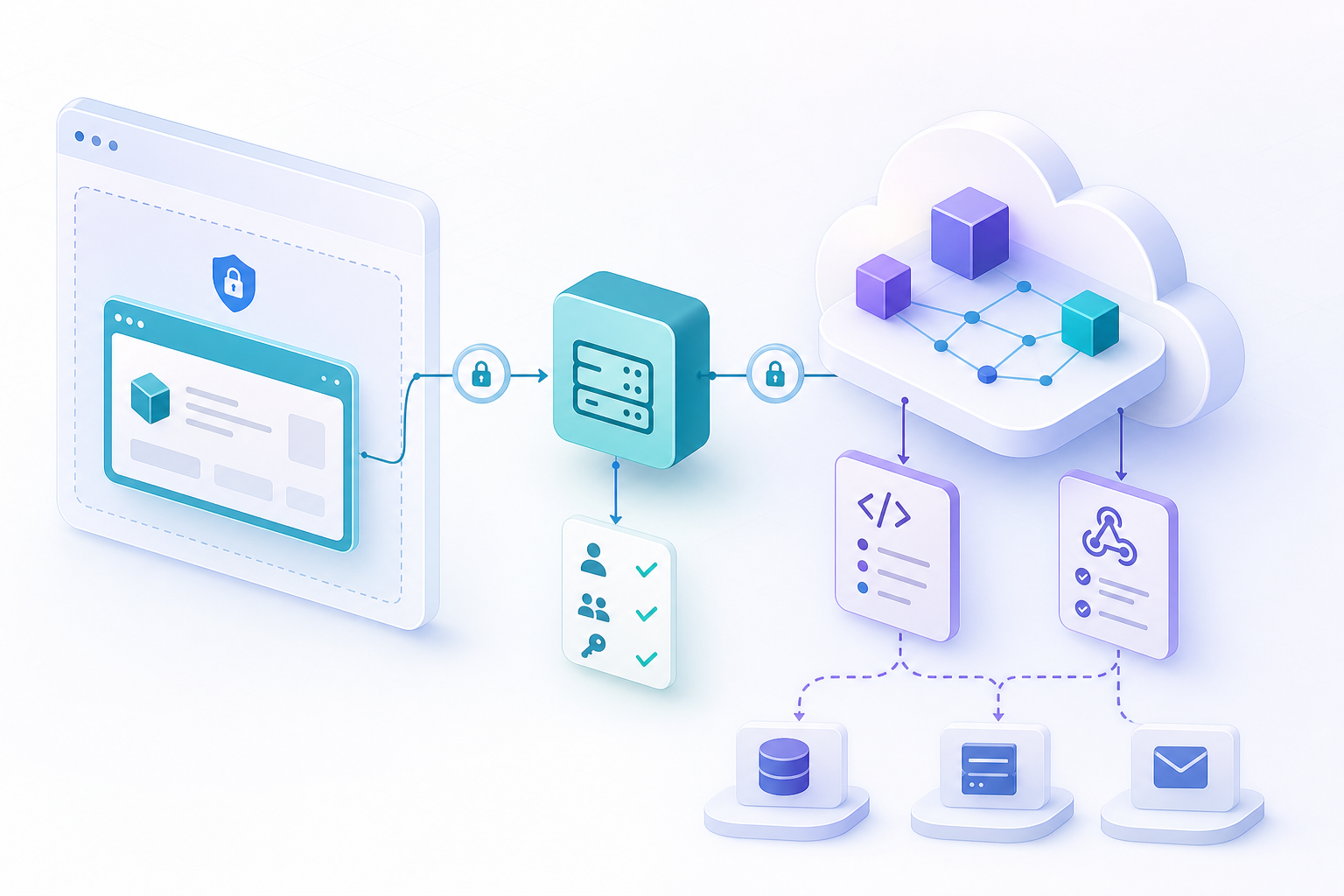
The problem: embedding does not mean handing over credentials
Integrating a file manager with an iframe and API often starts with a simple need: showing files, folders, transformations, or downloads inside an existing product. The common mistake is assuming that, if the interface appears in the browser, the keys that allow operations on Cloud must also travel to the browser. That mix breaks the basic separation between user experience and execution authority. The iframe should be used to present a controlled session; the REST API should be used from the server whenever resources, users, configuration, or transformation jobs need to be managed.
Apification offers three main options for this scenario: REST API, signed webhooks, and embedded Cloud. Embedded Cloud is integrated through a controlled and personalized session, with signed iframe sessions, themes and effective permissions, and JavaScript communication with the host. This is not the same as replicating all storage or exposing internal paths. It should not be confused with continuous synchronization from external sources either: when Google Drive, OneDrive, or Dropbox act as sources, the import copies selected files to Apification Cloud.
- Do not put API keys in client-side JavaScript.
- Do not turn an iframe into a proxy without business rules.
- Do not treat the embedded experience as a full copy of external storage.
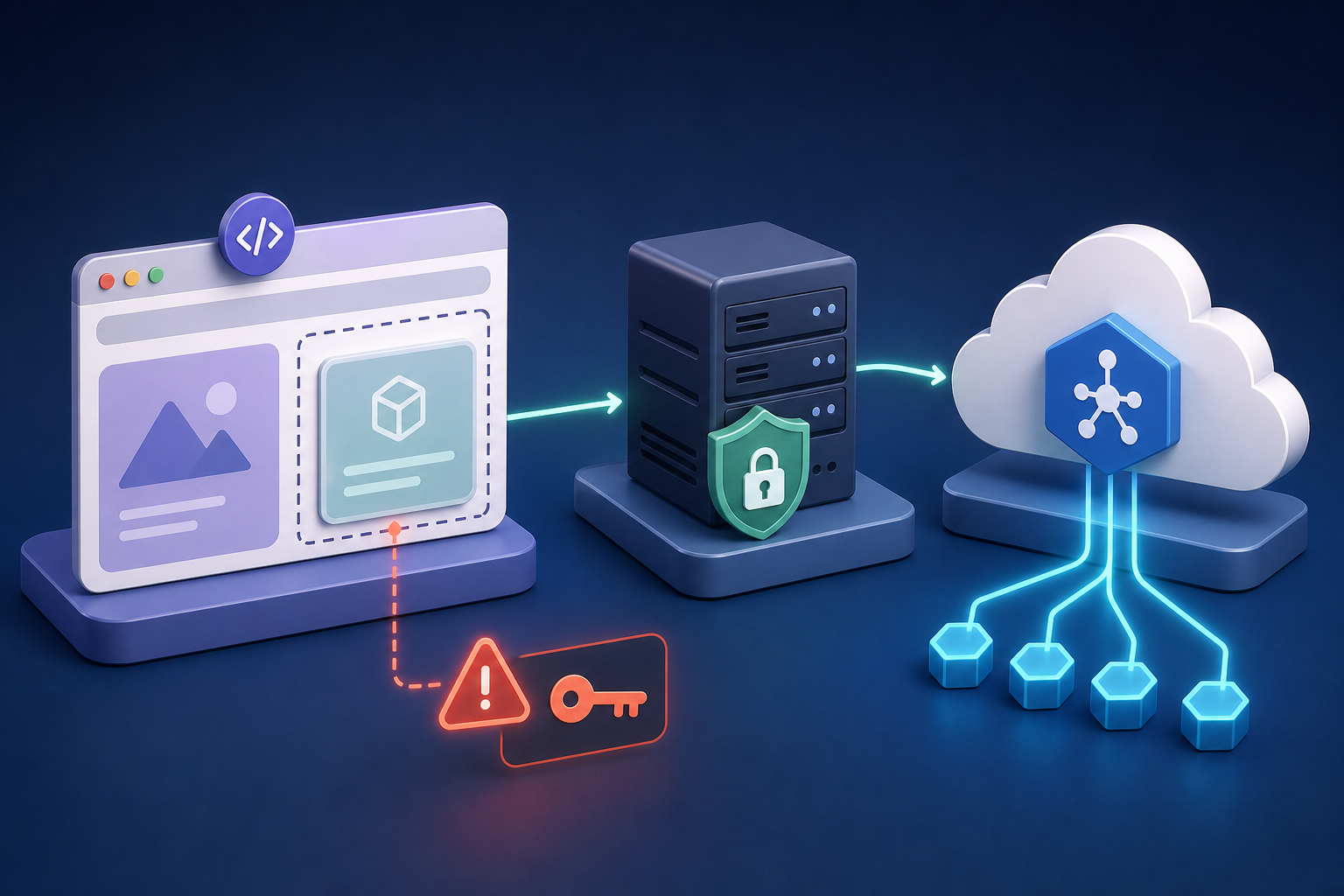
Responsibility map: frontend, backend, and Cloud
The frontend should handle the experience: opening the embedded area, reacting to allowed events, showing statuses, and requesting actions from the backend. An iframe, according to the general definition of the web platform, is a nested browsing context that embeds another page within the current one. Each iframe has its own document and navigation, and it consumes additional memory and resources, so it is best used when it provides a complete experience, not as an indiscriminate mechanism for every small operation.
The backend must safeguard credentials, apply the product’s own rules, and call the Apification REST API server to server. The REST integration supports API keys with scopes, idempotent write operations, and asynchronous File Transformer jobs. Apification Cloud, in turn, maintains the organized and versioned workspace, shareable resources, permissions, users, groups, roles, and visibility settings that control who can view or modify each item.
- Frontend: interface, iframe, limited JavaScript messages, and status display.
- Backend: own authentication, authorization, scopes, idempotency, and REST calls.
- Apification Cloud: files, services, effective permissions, versions, and transformed results.

When to use an iframe, JavaScript, REST API, or OpenAPI
Use embedded Cloud when you want the user to navigate a file management experience inside your product without rebuilding the entire interface. Apification allows signed iframe sessions with temporary access, and the server resolves the theme and effective permissions before opening Cloud. This fits client portals, SaaS dashboards, and back offices where the user needs to see a controlled part of the workspace, download originals or transformed files, or work within a visual experience that is consistent with the host product.
Use the REST API when the action has business consequences or must run under server-side rules: creating a transformation job, managing Cloud resources, applying configuration, or coordinating users. Use JavaScript only for limited communication between the host page and the iframe, not to execute sensitive authority. Use the downloadable OpenAPI 3.1 contract to align request and response schemas, generate internal clients, or validate integrations, remembering that scoped credentials still belong on the server.
- Iframe: best for a complete and controlled Cloud experience.
- JavaScript: useful for interface coordination, not for secrets.
- REST API: suitable for automation, backend rules, and jobs.
- OpenAPI: useful for the technical contract, types, tests, and change review.
Recommended pattern: backend as mediator
The most robust operating pattern starts with a user request to your application. The backend validates your own session, checks what that user can do according to your business model, and decides whether to open embedded Cloud or execute an action through the API. If Cloud is opened, the server prepares a signed and temporary session, with the theme and effective permissions resolved before delivering the experience to the browser. The client receives what it needs to display the iframe, not a reusable credential.
For write or transformation operations, the backend uses a scoped credential and grants only the required read and write permissions. When the action might be repeated because of browser retries or network issues, use idempotent operations to avoid duplicates. In heavy flows, such as imports, transformations, or renders, Apification can process jobs in the background. The recommended sequence is clear: scoped credential, idempotent request, asynchronous job, signed event, and authenticated result.
- Validate the user in your backend before creating an embedded session.
- Map business permissions to effective Cloud permissions.
- Use minimal scopes for the server credential.
- Design writes to tolerate retries without duplicating actions.
Permissions, themes, and restrictions without expanding access
The security of an embedded integration depends less on the iframe itself and more on how permissions are resolved before opening it. Apification uses users, groups, roles, and visibility as controls to decide who can view or modify each item. In an integration, those controls must be aligned with your product: if a customer can only see one project, the embedded session must not allow them to navigate to another customer’s resources, even if they know an identifier or manipulate URL parameters.
The visual theme should also be resolved from the server when the embedded session is prepared, because it is part of the controlled experience. On the browser side, consider standard iframe attributes as part of the interface defense: allow defines a Permissions Policy for features available by origin, and sandbox can impose restrictions on embedded content. The general recommendation is not to trust the client as the source of permissions, and to be careful with sandbox combinations that cancel out its security value in same-origin scenarios.
- Check user, group, role, and visibility before opening or executing actions.
- Do not accept permissions, theme, or final scope only from client parameters.
- Restrict iframe features to what the experience requires.
- Verify that downloads of originals or transformed files belong to the correct user.
Example flows: selector, transformation, and download
An embedded selector flow can work like this: the user enters your portal, selects a project, and clicks “open files.” Your backend validates that the user belongs to the project and requests an embedded session with appropriate effective permissions. The frontend inserts the iframe and, through limited JavaScript communication with the host, can receive a selection or close signal. The follow-up action should not blindly rely on an ID sent by the browser; the backend must verify that the selected item belongs to the allowed scope.
A transformation flow follows a different logic. The user requests conversion, splitting, merging, optimization, or processing of a document, image, video, audio, or data through an action in your product. The backend validates owner and permission, calls the REST API to create the asynchronous File Transformer job, and records an internal status such as “in progress.” When the result is available, the user should access it through an authenticated result, not through internal storage paths. If the original file changes, Cloud’s item and version history helps keep an organized source.
- Selector: embedded session, limited selection, and later validation in the backend.
- Transformation: permission, asynchronous job, visible status, and authenticated result.
- Download: original or transformed file only for the authorized user or group.
Webhooks and asynchronous actions without duplicates
Apification webhooks let you react to relevant events without continuously polling resources or background jobs. They include HMAC-signed payloads, delivery history, retries, and completed transformation events. To use them properly, you need an accessible and stable HTTPS endpoint. That endpoint should not simply accept any payload: it must validate the signature, record the received event, and relate it to the job or resource that your backend previously created.
Because retries exist, your receiver must be idempotent. In practice, record a delivery key or event reference and prevent the same completed transformation from triggering the same business action twice. It is also useful to separate technical status from visible status: “received,” “processing,” “completed,” or “failed” in your internal records; “your file is being prepared” or “the transformation could not be completed” in the interface. This helps the user understand progress without seeing internal details or storage paths.
- Require stable HTTPS for the webhook endpoint.
- Validate HMAC before trusting the payload.
- Store delivery history and the processing result.
- Make the handler idempotent when retries happen.
Failure cases and pre-production checklist
The most dangerous failures appear when the team tries to simplify the integration by bypassing the backend. An API key in JavaScript can be extracted from the client. A generic proxy that forwards any operation to the API can unintentionally expand permissions. An endpoint that trusts IDs sent by the browser falls into object-level authorization problems: the user changes an identifier and accesses someone else’s resource. The same logic applies to properties: not every field that arrives from the client should be accepted as editable.
There are also operational failures. If you do not record in-progress jobs, integration errors, or failed transformations, the user only sees silence. If you do not limit heavy actions, you may enable unintended resource consumption. If you do not distinguish embedding from importing from external sources, you may promise a kind of synchronization that does not apply. Before production, verify that your backend is the only component with credentials, that every action validates owner and permission, and that originals and transformed results maintain a single source of truth in Cloud.
- Credentials: no API key in the browser.
- Authorization: validate object, owner, group, role, and visibility in the backend.
- Scopes: grant only the necessary read and write access.
- Proxy: allow only the operations expected by your product.
- Asynchrony: record jobs, webhooks, retries, and errors visible to support.
- Resources: control heavy actions and avoid duplicate executions.
- User messages: show understandable statuses without exposing internal details.
Frequently asked questions
Can I use only an iframe to integrate Apification Cloud?
Yes, if your goal is to provide an embedded Cloud experience. Even so, the session must be controlled, signed, and temporary, with effective permissions resolved by the server before it is opened.
Where should Apification API keys live?
In the backend. The REST API is designed for server-to-server use, with scoped API keys and the minimum necessary permissions. They should not be exposed in client-side JavaScript.
When should I use webhooks?
When you need to react to relevant events, such as a completed transformation, without continuously polling background jobs. The endpoint must be HTTPS, stable, and validate HMAC-signed payloads.
Does embedded Cloud replace synchronization with Google Drive, OneDrive, or Dropbox?
No. It is an embedded Apification Cloud experience. External sources can provide selected files through import into Cloud, but they should not be treated as continuous synchronization.
What authorization error is most common in these integrations?
Trusting identifiers sent by the browser without validating that the user can access the object. The backend must check owner, group, role, visibility, and permission before executing actions or delivering results.
Sources and further reading
Documentation consulted while preparing this article.
- Página oficial de integración API y embebida de Apification — Apification
- Página oficial de automatización de procesos de Apification — Apification
- OWASP AJAX Security Cheat Sheet — OWASP Cheat Sheet Series
- OWASP Cryptographic Storage Cheat Sheet — OWASP Cheat Sheet Series
- OWASP API Security Top 10 2023 — OWASP API Security Project
- OWASP API1:2023 Broken Object Level Authorization — OWASP API Security Project
- OWASP API3:2023 Broken Object Property Level Authorization — OWASP API Security Project
- OWASP API4:2023 Unrestricted Resource Consumption — OWASP API Security Project
Explore Apification
Related articles

APIs and automation
Spreadsheet Dates in APIs: Avoid Ambiguous Formats and Day Changes
A practical guide to defining what each date represents, agreeing on an explicit format, and checking that data retains its meaning as it moves between a spreadsheet and an API.

APIs and automation
API Pagination: How to Navigate a Collection
Learn how to read pagination documentation, follow its continuation instructions, and assess whether a collection traversal reached its documented end.

APIs and automation
Change an API-Connected Form Without Breaking the Integration
A cautious, practical guide to changing labels, fields, formats, and required-field rules while checking how receiving systems respond.