Security and privacy
External Authentication Is Not File Access: Separating Identity, Invitations, and Permissions
An operational guide to separating sign-in from the invitation required to access Apification and from file permissions, with practical checks for diagnosing access failures.

Separate Sign-In, Account Access, and File Permissions
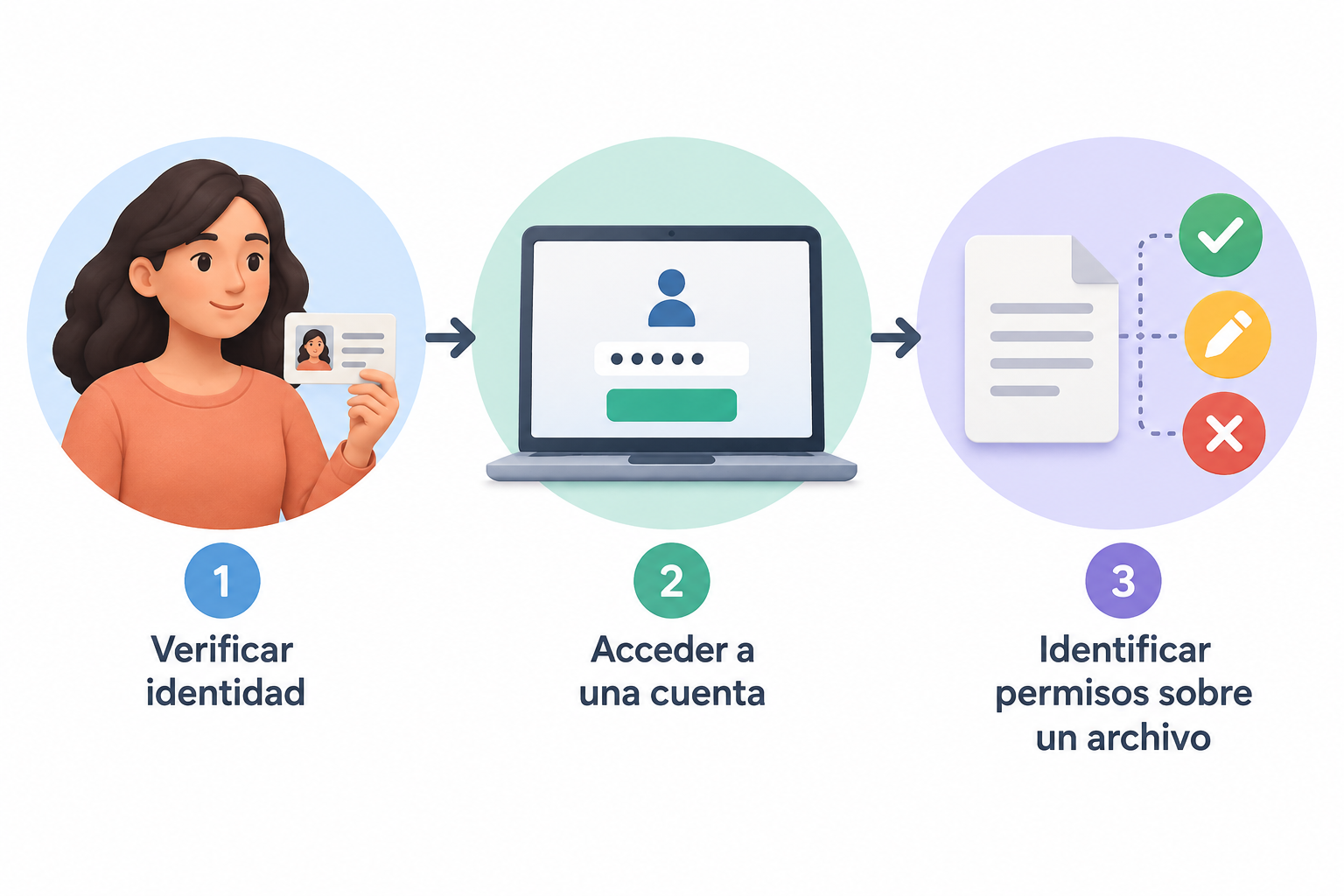
Authentication verifies a person's identity; authorization determines their level of access to resources. These are related but distinct decisions. In Apification, account access requires an invitation, while external authentication is a separate security capability. Neither should be taken as proof that someone can open a particular file.
When someone cannot complete a task, locate the failing step: can they sign in with the intended identity, access the Apification account, and open the specific item? This sequence helps distinguish an authentication problem from an account-access or resource-permission problem.
Apification lets you share items through links, users, or groups. Available permission options depend on the item and what the service displays. Check those options instead of assuming that a sign-in, invitation, or link provides access to every resource.
- Sign-in: Is the person using the intended identity, and can they authenticate?
- Account: Has the required invitation been handled, and can they access the account?
- File: Was the specific item shared, and which available permission options were selected?
Choose a Sharing Method for the Task
Start by identifying who needs access, which item they need, and what they need to do with it. Then compare the sharing methods and permission options shown for that item. A link, selecting users, and selecting a group are different ways to share; do not infer additional behavior, such as inherited access or a particular link scope, unless it is documented.
For example, suppose one collaborator needs a particular document for review. Identify that document and the intended recipient, then check whether the available link, user, or group choices fit the way you plan to share it. Review the permission options shown and choose only an option that suits the task. If the service does not make the effect clear, check its documentation or ask an administrator rather than guessing.
A short record of the recipient or group, item, purpose, and selected option can help answer later questions about what was shared. Treat it as a practical note, not as a record Apification necessarily creates automatically.
- Identify the task and the specific item required.
- Compare link, user, or group sharing choices shown for that item.
- Review the available permission options and their documented effects.
- Record the resource and access choice for later reference.

Make Onboarding and Sharing Deliberate
Include the required Apification invitation in onboarding, and confirm that the collaborator can access the account before relying on them for a task. External authentication should not be assumed to create an account or replace the invitation.
After account access is confirmed, share only the resources needed for the work with the intended recipients or groups. An account invitation and sharing an item are separate steps; completing one does not establish that the other is in place.
When a task changes or a collaboration ends, revisit the items shared and decide whether access is still needed. Check the options shown for each resource rather than assuming that changing one sharing method affects every other one.
- Handle the required invitation and confirm account access.
- Share the specific resources needed for the task.
- Revisit sharing choices when the work or collaboration changes.
Use Documented Information for External Authentication
Apification includes external authentication among its security capabilities, but the available product information does not specify supported protocols, providers, or automatic provisioning. Configure only options documented for your environment; do not infer compatibility from another product or from the general term external authentication.
Before a configuration change, state the expected outcome precisely: successful sign-in, account access, or access to a particular shared item. These are separate results. If documentation does not explain whether signing in creates accounts, adds people to groups, or grants resource permissions, treat those behaviors as unknown and ask the responsible administrator.
- Check documentation for the specific environment and feature.
- Do not assume support for a particular protocol or provider.
- Do not assume automatic account, group, or permission provisioning.
Test and Diagnose Access Carefully
If you need to validate an onboarding process, use an authorized test account and no sensitive data. Check sign-in, account access, and opening the intended item as separate steps. Record the identity used, the item and sharing method involved, and what happened at each step. This is a general troubleshooting practice, not a special Apification testing feature; do not record credentials or secret authentication details.
If sign-in fails, review the identity and documented authentication settings with the responsible administrator. If sign-in succeeds but account access fails, check the required invitation. If account access works but the item does not open, review how it was shared and the permission options selected. Change one thing at a time so the result is easier to understand and does not broaden access unnecessarily.
Ask the person what they were trying to do and what message they saw. If the result or a permission option is unclear, consult the applicable documentation or support instead of inferring a rule from another product or an ambiguous test.
Apification lets you review Cloud item history, download earlier versions, and restore content. These capabilities can help with content recovery, but they do not replace reviewing who can access a resource. Treat restoring content and reviewing sharing as separate tasks.
- Cannot sign in: review the identity and documented authentication settings.
- Can sign in but cannot access the account: check the required invitation.
- Can access the account but not the item: review its sharing method and selected options.
- Keep content recovery separate from access review.
Frequently asked questions
Does external authentication automatically create an Apification account?
Do not assume it does. Account access requires an invitation, and the available product information does not confirm that external authentication provisions accounts.
Does an invitation guarantee access to every file?
No. An invitation is required for account access, but it does not by itself establish that a particular item has been shared with the person. Review the sharing and permission options for that resource.
Which external authentication protocols does Apification support?
The available product information does not specify protocols or providers. Consult the applicable documentation before configuring external authentication.
What should I check if someone can access their account but cannot open a file?
Check that the intended item was shared with them or their group, and review the permission options selected for that item.
Sources and further reading
Documentation consulted while preparing this article.
- Introducción al uso compartido externo en SharePoint y OneDrive — Microsoft Learn
- Autenticación o autorización: ¿cuál es la diferencia? — IBM
- Configurar la autenticación externa — Claris Help Center
Explore Apification
Related articles

Security and privacy
How to Test File API Permissions: Resources, Actions, and Negative Cases
A general guide to planning permission tests for a file API. Specific criteria depend on each service’s documentation and configuration.

Security and privacy
How to Safely Hide Data in a PDF: Redaction, Checks, and Sharing
An operational guide to distinguishing redaction from visual masking, reviewing the copy, and sharing only the file you need.

Security and privacy
How to Prevent Forms from Collecting Sensitive Data They Don’t Need
Review every question, limit open-ended answers, and establish a careful process for reviewing, sharing, and exporting responses.